
调用方法
地址说明
通过获取程序Api地址接口返回参数中ApiServerAddress的值
调用方法
POSTContentType: application/x-www-form-urlencoded;Charset=UTF-8
参数:
| 参数名 | 必选 | 类型 | 说明 |
|---|---|---|---|
| managename | 是 | string | 接口名 固定值为:GraspCMServerApi.dll |
| dbname | 是 | string | 数据库名称 |
| processtype | 是 | int | 过账类型 目前只支持 0新增保存 |
| vchtype | 是 | int | 单据类型 详见具体单据 |
| vchcode | 是 | int | 单据vchcode |
| billdata | 是 | string | 凭证数据json 详见文档:凭证Json格式 |
| apiparam | 是 | string | 通过获取程序API地址接口返回 |
| apitype | 是 | string | 接口类型 传process |
| sign | 是 | string | 签名字符串 |
| mobile | 是 | string | 云平台手机号 获取API地址返回的GraspCloudMobile,为空时传0 |
| serviceid | 是 | string | 云平台ServerID 获取API地址返回的GraspCloudServerId,为空时传0 |
| interiorapi | 是 | int | 该参数始终为1 |
参数传入说明
1、采用x-www-form-urlencode的方式传参,即参数通过key=value&key=value拼接成字符串,再通过Body传入。
2.再拼接字符串时需要对参数中的所有value做URLEncode,特别注意只有再拼接Post传入参数时才对Value做URLEncode,而计算签名时不要进行转译
sign签名规则
- 将上述参数中除了sign以外的所有参数,根据参数名按照字母排序,以Key+Value的形式拼接字符串。
- 字符串拼接后在结尾加上SigKey。(SignKey获取方法见:获取接口所需SignStr接口)
- 将这个最终拼接成的字符串通过MD5加密,取32位小写。
MD5加密前字符串示例
apiparam7/eAVT1NN2MtBY+MkAylEBVN/FsnC9BL4IzSHtHyt+2s+jAZRVqfMAwzFgSudBH3eDau916Vd6aNEFxve2ZoYey1Zvi+Vp8xb7VrAnJNbCs=apitypeprocessbilldata{"date":"2020-03-04","summary":"","vouchertypeshortname":"记","voucherno":12,"attach":1,"inputno":"会计主管","detail":[{"ausercode":"1001","afullname":"库存现金","busercode":"","bfullname":"","eusercode":"","efullname":"","dusercode":"","dfullname":"","musercode":"","mfullname":"","foreignname":"","wrate":"","qty":"","jfullname":"","jbillno":"","jdate":"","comment":"","debittotal":100,"lendtotal":"","wtotal":""},{"ausercode":"1002","afullname":"银行存款","busercode":"","bfullname":"","eusercode":"","efullname":"","dusercode":"","dfullname":"","musercode":"","mfullname":"","foreignname":"","wrate":"","qty":"","jfullname":"汇兑","jbillno":1,"jdate":"2020-01-01","comment":"","debittotal":"","lendtotal":100,"wtotal":""}]}dbnameM7215API测试interiorapi1managenameGraspCMServerApi.dllmobile0processtype0serviceid0vchcode0vchtype1252020cmgmsignkeyappkey@#986
PostMan传参示例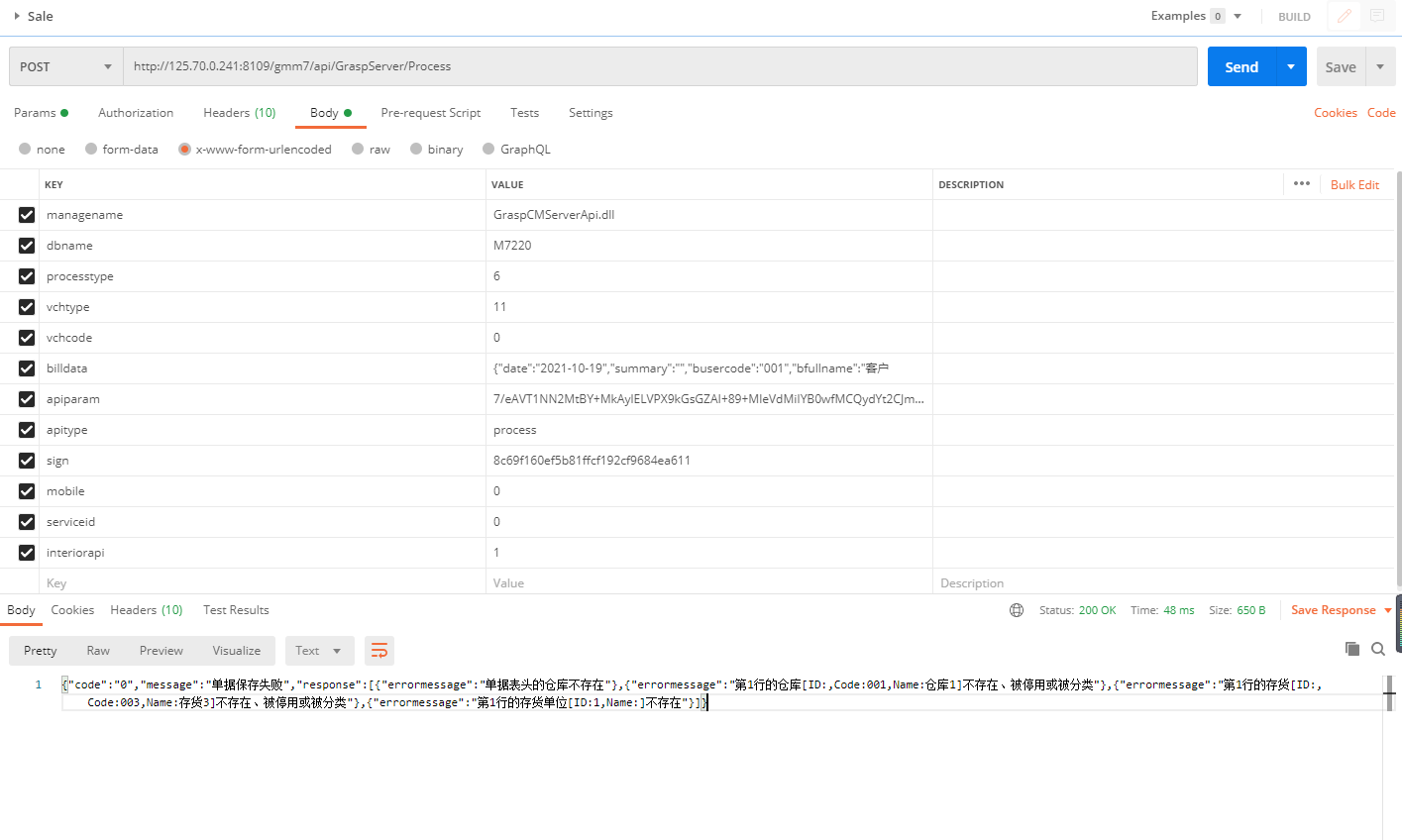
返回参数说明
| 参数名 | 类型 | 说明 |
|---|---|---|
| code | string | 小于等于0表示失败 成功时会返回凭证的vchcode |
| message | string | 单据过账消息 成功还是失败都会返回消息 |
| response | json数组 | 失败时会返回具体的错误信息 |
错误信息response
| 参数名 | 类型 | 说明 |
|---|---|---|
| errormessage | string | 错误信息 |
返回参数示例
{
 "code": "-1",
 "message": "单据过账失败。",
 "response": [
   {
     "errormessage": "单据表头的仓库不存在"
   },
   {
     "errormessage": "单据表头的结算单位不存在"
   }
 ]
}